
সংবাদ শিরোনাম : HSC Result 2026 How to Check Results Online and via SMS – Complete Guidelines
Staff Reporter
Publication Date: 30 October 2026
Millions of candidates across the country are eagerly waiting for the results of the 2026 Higher Secondary Certificate (HSC) and equivalent examinations. The results are scheduled to be officially published on Saturday (October 31) at 11:00 am.
After the results are announced, candidates will be able to check their results from home using mobile phones and the internet. Those without internet access will also have the option of checking their results by sending an SMS from any mobile phone.
According to the procedures set by the education boards, candidates can collect their results through the official education board websites, mobile SMS services, and their respective educational institutions. Therefore, alternative methods will remain available even if the websites experience heavy traffic on the day of the result publication.
A total of 1,270,583 candidates appeared in this year's HSC and equivalent examinations under 11 education boards. They include candidates from the general education boards, the Bangladesh Madrasah Education Board, and the Bangladesh Technical Education Board.
How to Check HSC Results Online
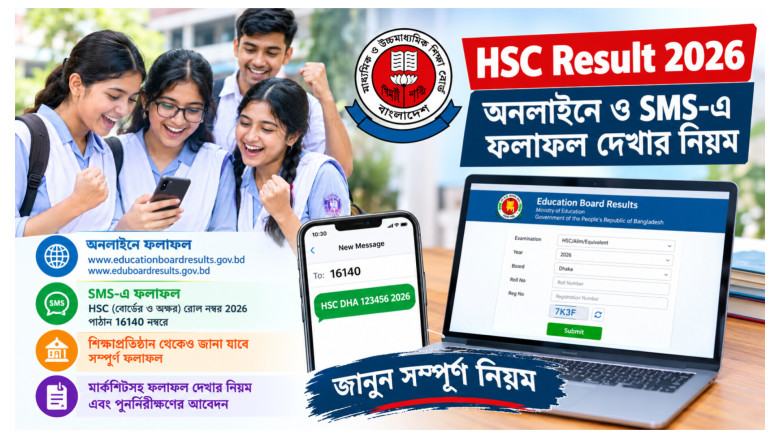
To check HSC examination results online, candidates must first visit the designated education board website using a browser on their mobile phone or computer.
The results will be available on the following two websites:
1. https://www.educationboardresults.gov.bd
2. https://eduboardresults.gov.bd
After entering the website, candidates will need to provide several required details. First, they must select HSC/Alim/Equivalent as the examination type. Then, they need to select 2026 as the examination year.
In the next step, candidates must select their respective education board, such as Dhaka, Chattogram, Rajshahi, Cumilla, Jashore, Barishal, Sylhet, Dinajpur, Mymensingh, Madrasah, or Technical Education Board.
Candidates must then enter their examination roll number and registration number in the designated fields. After correctly completing the CAPTCHA or security verification code displayed on the website, they need to click the Submit button.
If all the information is correct, the candidate's result will appear on the screen.
Candidates are advised to carefully check their roll and registration numbers against their examination admit cards before entering the information. Incorrect details may prevent the results from being displayed.
How to Check HSC Results with Marksheet
Candidates who wish to see not only their GPA but also subject-wise results and other detailed information can use the education board's web-based result publication portal.
To do this, candidates need to visit https://eboardresults.com/v2/home and select the examination name, year, and education board.
Next, they should select Individual/Detailed Result from the Type of Result option, if available.
After entering their roll number and other required information, candidates can search for their results and view the detailed information available on the portal.
However, the types of marks and subject-wise information displayed will depend on the data published by the respective education board and the facilities available on the portal.
How to Check HSC Results via SMS Without Intern
Candidates who do not have smartphones or access to an internet connection can also easily check their results through the SMS service using any mobile phone.
To do so, they need to open the messaging option on their mobile phone and type an SMS using the prescribed format.
SMS Format:
HSC (Space) First Three Letters of Board Name (Space) Roll Number (Space) 2026
For example, if a candidate under the Dhaka Education Board has the roll number 123456, the message should be written as follows:
HSC DHA 123456 2026
The message must then be sent to 16140
After sending the SMS, candidates will receive a reply containing their examination results. The charge for each SMS is Tk 1.39.
Candidates should ensure that they have sufficient mobile balance before sending the message.
It is important to follow the prescribed format carefully, including the first three English letters of the education board's name, the roll number, and the examination year. Sending an SMS in an incorrect format may cause problems in receiving the results.
Results Also Available Through Educational Institutions
In addition to online and SMS services, candidates can also collect their results from their respective colleges or educational institutions.
Educational institutions can download the complete result sheets by visiting the Result option on the designated education board website, selecting the relevant board, and entering the institution's EIIN number.
Therefore, candidates who face difficulties checking their individual results online can also contact their respective educational institutions to obtain their results.
When Can Candidates Apply for Result Re-scrutiny?
Candidates who are dissatisfied with their published results or have not received their expected grades in any subject will have the opportunity to apply for answer script re-scrutiny.
According to the information published by the education boards, applications for re-scrutiny will be accepted from November 1 to November 7.
Detailed instructions regarding the application process will be published on the respective education board websites.
On the day of result publication, the websites may become slow due to a large number of candidates accessing them simultaneously. In such situations, candidates are advised to wait for a while and try again rather than repeatedly refreshing the websites.
If necessary, they can use alternative websites or the SMS service to check their results.
However, candidates are advised to use only the designated education board websites and avoid entering personal information on unfamiliar websites when checking their results.